

DevOps
评论2,555字数 690阅读2分18秒阅读模式

Elasticsearch集群配置信息
硬件配置信息
|
机器名/节点名 |
IP |
内存 |
cpu |
磁盘 |
|
us-prod-sre-eslog-node-1 |
10.0.3.77 |
32GB |
16vcpu |
7T |
|
us-prod-sre-eslog-node-2 |
10.0.3.149 |
32GB |
16vcpu |
7T |
|
us-prod-sre-eslog-node-3 |
10.0.3.228 |
32GB |
16vcpu |
7T |
集群版本信息
|
组件名称 |
版本 |
安装节点 |
安装位置 |
数据存储位置 |
服务使用命令 |
|
Elasticsearch |
7.17.4 |
10.0.3.77 |
/data/elasticsearch |
/eslog |
service elasticsearch start/stop/restart |
|
10.0.3.149 |
|||||
|
10.0.3.228 |
|||||
|
Kibana |
7.17.4 |
10.0.3.228 |
/data/kibana/ |
|
sudo systemctl start/stop/restart kibana |
|
elastalert |
v0.2.4 |
10.0.3.149 |
|
|
sudo supervisorctl update |
集群安全配置
-
服务对外使用alb代理以及安全组IP限制和xpack账号密码认证
![EFK集群[案例]-图片1](https://devops.ubuntu.ltd/wp-content/uploads/2022/09/2022092017505680.png)
![EFK集群[案例]-图片1](https://devops.ubuntu.ltd/wp-content/uploads/2022/09/2022092017510466.png)
![EFK集群[案例]-图片1](https://devops.ubuntu.ltd/wp-content/themes/begin/img/loading.png)
-
对内服务加xpack账号密码认证
[centos@us-prod-ops-logan-2 config]$ grep -v "^$" filebeat.yml | grep -v "^#"
filebeat.inputs:     #收集日志
- type: log         #类型
  enabled: true     #始终收集
  paths:
    - /data/logs/logan-server/error.log
    - /data/logs/logan-server/info.log
  fields:
    type: 'ops-logan'
  multiline.type: pattern
  multiline.pattern: '^\['
  multiline.negate: true
  multiline.match: after
  multiline.timeout: 3s
  ignore_older: 24h
processors:
  - drop_fields:
      fields: ["agent","metadata","sort","beat","input_type","offset","input","prospector"]
setup.ilm.enabled: false
setup.template.settings:
  index.number_of_shards: 1
  index.number_of_replicas: 1
output.elasticsearch:
  hosts: ["http://es.prd.aws.us:9200"]
  protocol: http
  username: "elastic"
  password: "XJhNk96fVhPFddrAbPbJt8XCJmGnFM9orGZXEuiSPrK"
  indices:
    - index: "ops-logan-%{+yyyy.MM.dd}"
      when.equals:
        fields.type: 'ops-logan'
Kibana
管理员账号信息
-
管理员账号 elastic
-
管理员密码 XJhNk96fVhPFddrAbPbJt8XCJmGnFM9orGZXEuiSPrK
开发人员使用信息
-
开发人员使用账号Lingoace
-
开发人员账号密码fB32uyQg8^qYY*W4fxZr4JwXAiNn3
-
只有日志查询权限,无其他任何权限。
![EFK集群[案例]-图片2](https://devops.ubuntu.ltd/wp-content/uploads/2022/09/2022092017522031.png)
企业微信日志告警
-
进入节点2操作
[centos@us-prod-sre-eslog-node-2 ~]$ sudo -s
[root@us-prod-sre-eslog-node-2 centos]# cd /data/elastalert/rules/
[root@us-prod-sre-eslog-node-2 rules]# ls
ops-logan.yaml
-
配置告警规则
[root@us-prod-sre-eslog-node-2 rules]# cat ops-logan.yaml
name: ops-logan日志报警 ERROR字段
type: frequency
index: ops-logan*
num_events: 2
timeframe:
  minutes: 2
realert:
  minutes: 4
filter:
- query:
    query_string:
      query: "ERROR,error"
alert:
- "elastalert_modules.wechat_qiye_alert.WeChatAlerter"
alert_text_args:
  - name
  - message
corp_id: "ww2e9d48685d7dc479" #lingoace
secret: "9wlYzQqd1LkS9hFQz_xVkbkOBO9kfy6Okagy4IrNKTI" #lingoace
agent_id: 1000056 #lingoace
party_id: ""
user_id: "@all"
tag_id: ""
-
手动启动,看看有没有错误。
[root@us-prod-sre-eslog-node-2 elastalert]# python -m elastalert.elastalert --verbose --config /data/elastalert/config.yaml --rule /data/elastalert/rules/ops-logan.yaml
/usr/local/python/lib/python3.6/site-packages/stomp/transport.py:31: CryptographyDeprecationWarning: Python 3.6 is no longer supported by the Python core team. Therefore, support for it is deprecated in cryptography and will be removed in a future release.
  from cryptography import x509
1 rules loaded
/usr/local/python/lib/python3.6/site-packages/apscheduler/util.py:436: PytzUsageWarning: The localize method is no longer necessary, as this time zone supports the fold attribute (PEP 495). For more details on migrating to a PEP 495-compliant implementation, see https://pytz-deprecation-shim.readthedocs.io/en/latest/migration.html
  return tzinfo.localize(dt)
INFO:elastalert:Starting up
INFO:elastalert:Disabled rules are: []
INFO:elastalert:Sleeping for 59.999939 seconds
INFO:elastalert:Queried rule ops-logan日志报警 ERROR字段 from 2022-06-14 03:54 UTC to 2022-06-14 03:54 UTC: 0 / 0 hits
INFO:elastalert:Ran ops-logan日志报警 ERROR字段 from 2022-06-14 03:54 UTC to 2022-06-14 03:54 UTC: 0 query hits (0 already seen), 0 matches, 0 alerts sent
-
如报警正常,无任何错误信息。直接退出使用supervisorctl更新即可。
[root@us-prod-sre-eslog-node-2 elastalert]# supervisorctl update
-
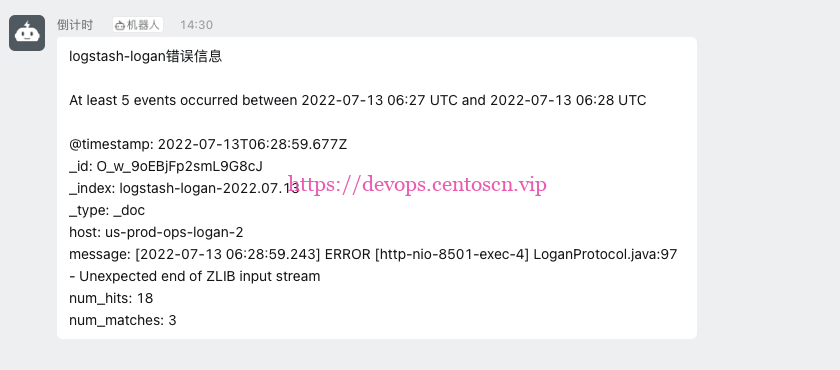
企业微信告警展示
继续阅读





评论